
PCN management software helps fleet managers turn scattered penalty notices into a controlled, trackable process. Without it, a parking charge notice can sit in an inbox, miss an appeal window, or get paid before anyone checks whether it is valid. Across a busy fleet, that creates avoidable cost, driver disputes, and poor visibility.
The problem is the workflow around the fine. A fleet pcn management workflow gives your team one place to receive, assign, review, appeal, pay, and report on every PCN.
The True Cost of Manual PCN Management
Manual PCN handling looks simple until volume rises. Someone has to identify the vehicle, find the driver, collect evidence, decide whether to appeal, process payment, recharge costs, and update records.
When that process lives on spreadsheets and shared inboxes, mistakes happen. Deadlines slip. Duplicate payments appear. Valid appeals get missed.
Manual admin also hides trends. You may know fines are rising, but not which depots, routes, clients, sites, or drivers create the most exposure. That is why PCN management should sit inside a wider fleet PCN management strategy.
The 5 Critical Features Every PCN Management Software Must Have
Good fleet pcn management tools do more than store notices. They help you act faster and make better decisions.
Look for these five essentials:
- Centralized PCN inbox for all notices and suppliers
- Deadline tracking for appeals, discounts, escalations, and payments
- Driver and vehicle matching using registration, depot, route, or hire records
- Evidence storage for receipts, telematics, delivery notes, photos, and correspondence
- Reporting dashboards showing cost, appeal outcomes, hotspots, and repeat issues
Feature Deep-Dive #1: Real-Time PCN Tracking Across Your Fleet
Real-time tracking gives managers a live view of every notice. You can see what arrived, who owns it, what stage it has reached, and what needs action today.
A delayed review can mean a missed discount, a lost appeal deadline, or an unnecessary charge. Real-time tracking also stops notices from getting stuck between finance, operations, compliance, and depot teams.
The best systems use status labels such as new, investigating, appeal submitted, awaiting decision, paid, cancelled, or recharged. That visibility improves accountability immediately.
Feature Deep-Dive #2: Telematics Integration (The Game-Changer)
Telematics integration is where PCN management software becomes far more powerful.
Instead of asking a driver where they were weeks ago, the system can link a notice to vehicle location, journey history, stop duration, route activity, and delivery timing.
If a van receives a parking charge notice while completing a scheduled drop, telematics can support the timeline. If a vehicle was elsewhere, it may indicate an error, cloned plate, or incorrect registration capture.
This feature also improves your fleet management workflow because PCN review becomes evidence-led, not memory-led.
Feature Deep-Dive #3: Automated Evidence Collection & Organization
Evidence wins or loses appeals. Good software should make evidence gathering simple.
Look for a system that can attach delivery notes, site records, photos, permit details, payment receipts, driver statements, and telematics files to the correct notice. It should also keep a clean audit trail.
This makes appeals faster to prepare and defend. It also shows which evidence works for different parking violations and traffic enforcement cases.
Looking for these features in one place? Snapmyfine helps fleet teams centralize PCNs, track deadlines, organize evidence, and connect the right notice to the right vehicle faster. Instead of relying on spreadsheets and scattered inboxes, you can manage the full PCN workflow with more visibility and control. Explore Snapmyfine’s PCN management to see how it can support your fleet.
The Feature Comparison Matrix: What Separates Good from Great
A basic tool stores PCNs. A strong tool manages decisions.
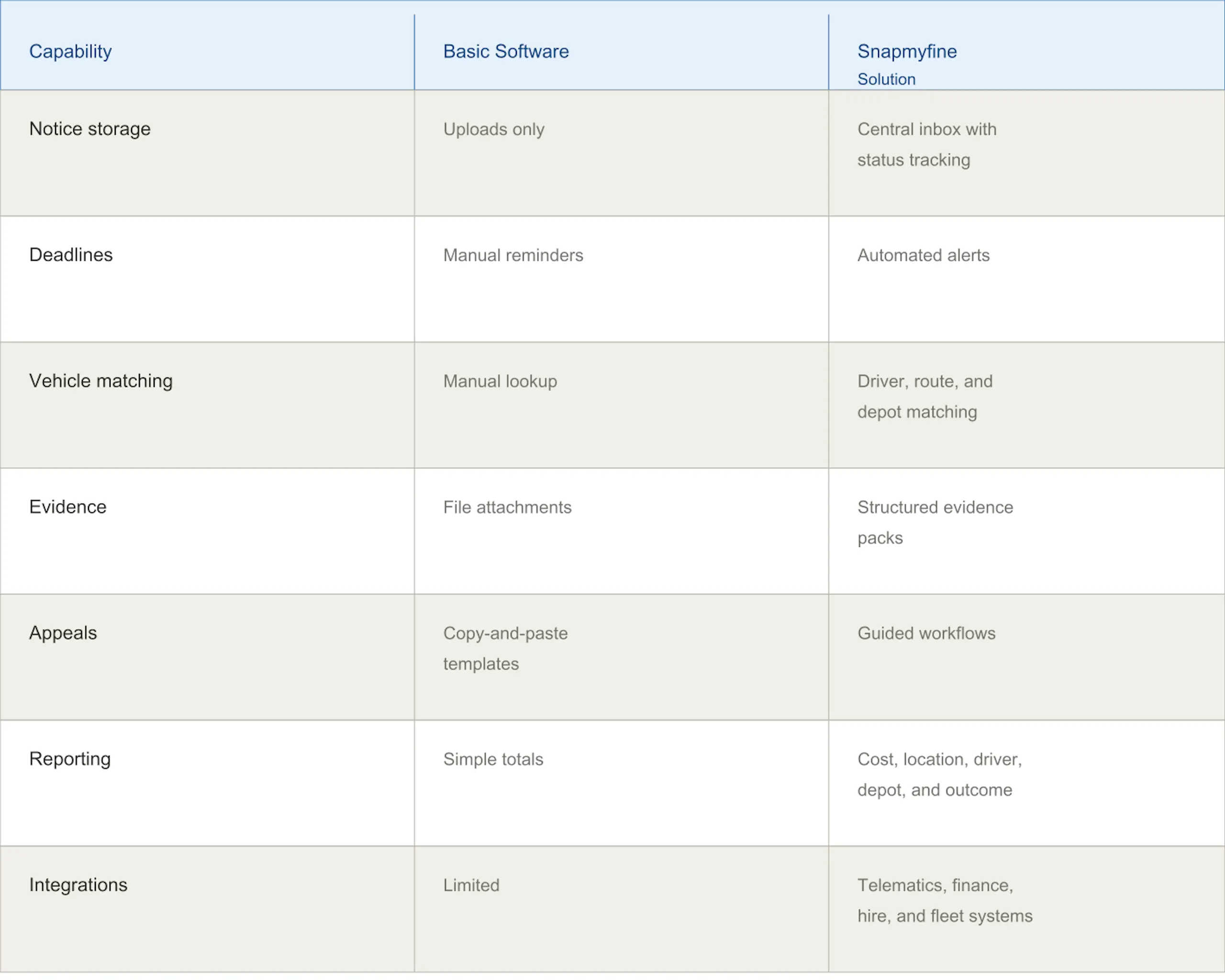
Use this PCN software comparison when reviewing suppliers. The right platform should reduce work, not add another admin layer.
ROI Calculator: What Should You Expect to Save?
A practical ROI estimate starts with four numbers:
- Average PCNs per month
- Average cost per PCN
- Average admin time per notice
- Current appeal success rate
Then ask what software could reduce. Savings often come from fewer missed deadlines, faster matching, stronger appeals, lower admin time, better recharge recovery, and fewer repeat parking violations.
If your team handles 200 notices monthly and saves 10 minutes each, that is over 33 hours recovered before avoided fines.
Use Snapmyfine’s simple savings slider to see how the number of PCNs in your fleet can translate into potential time and cost savings. Try the Snapmyfine savings calculator.
Start Getting Your PCN Management Up & Running
Before launch, map your current process. Decide who receives notices, who validates them, who contacts drivers, who approves appeals, and who handles payment.
Then prepare your data: vehicle list, driver records, depot structure, hire agreements, telematics access, finance codes, and appeal templates.
Start with one depot, measure results, then roll out across the fleet. Review your first 90 days to spot savings, missed evidence, and repeat hotspots. Link those insights back to your broader fleet PCN management plan.
You just found Your Perfect PCN Management Solution !
Snapmyfine helps fleet managers replace PCN chaos with a clear, automated workflow. Your team can centralize notices, track deadlines, connect evidence, manage appeals, and see where costs come from.
Book a demo to see how it works for your fleet.
Conclusion
PCN management software gives fleet operators the structure they need to manage notices with confidence. It improves visibility, speeds decisions, and turns repeated fines into useful operational insight.
Audit your last 90 days of PCNs. Then choose software that supports your workflow, evidence needs, and growth plans, with less stress.
